开源单点登录系统CAS入门
一、什么是CAS
CAS 是 Yale 大学发起的一个开源项目,旨在为 Web 应用系统提供一种可靠的单点登录方法,CAS 在 2004 年 12 月正式成为 JA-SIG 的一个项目。CAS 具有以下特点:
【1】开源的企业级单点登录解决方案。
【2】CAS Server 为需要独立部署的 Web 应用。
【3】CAS Client 支持非常多的客户端(这里指单点登录系统中的各个 Web 应用),包括 Java, .Net, PHP, Perl, Apache, uPortal, Ruby 等。
从结构上看,CAS 包含两个部分: CAS Server 和 CAS Client。CAS Server 需要独立部署,主要负责对用户的认证工作;CAS Client 负责处理对客户端受保护资源的访问请求,需要登录时,重定向到 CAS Server。下图是 CAS 最基本的协议过程:
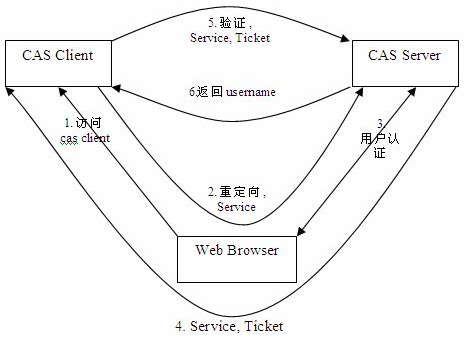
SSO单点登录访问流程主要有以下步骤:
1. 访问服务:SSO客户端发送请求访问应用系统提供的服务资源。
2. 定向认证:SSO客户端会重定向用户请求到SSO服务器。
3. 用户认证:用户身份认证。
4. 发放票据:SSO服务器会产生一个随机的Service Ticket。
5. 验证票据:SSO服务器验证票据Service Ticket的合法性,验证通过后,允许客户端访问服务。
6. 传输用户信息:SSO服务器验证票据通过后,传输用户认证结果信息给客户端。
二、CAS服务端部署
下载CAS4.0.0(选择4.0.0 的原因是:4.0.0以后打包比较麻烦,4.0.0版本内有打包好的war)。
下载地址为:
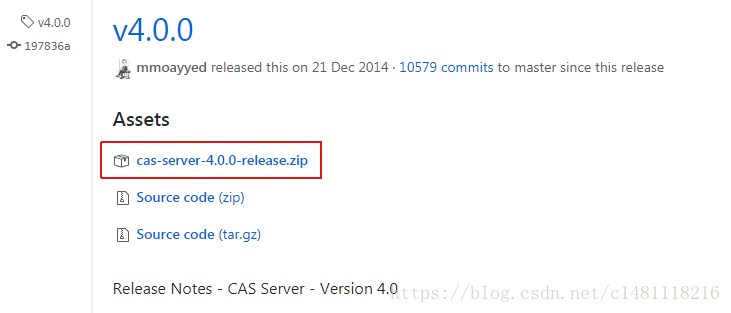
解压cas-server-4.0.0-release.zip,将cas-server-4.0.0-release\cas-server-4.0.0\modules目录下的cas-server-webapp-4.0.0.war改名为cas.war,并放入tomcat目录下的webapps下。启动tomcat自动解压war包。浏览器输入http://localhost:8080/cas ,即可看到登录页面

这里有个固定的用户名和密码:casuser /Mellon

这个初始用户名和密码在cas\webapps\cas\WEB-INF\deployerConfigContext.xml中有配置
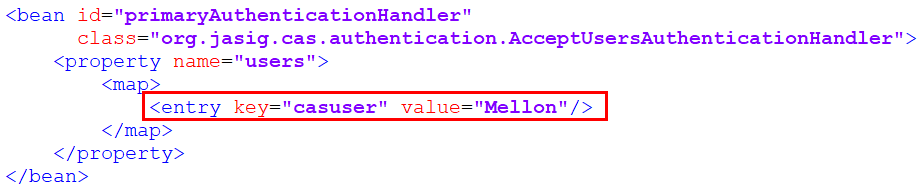
如果想新增一个用户,增加一个<entry>标签即可。
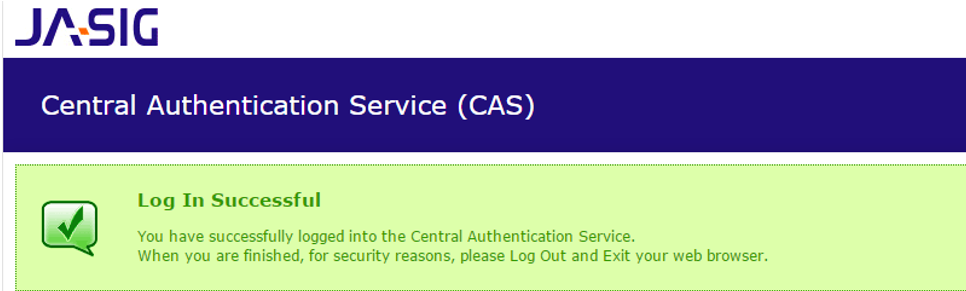
登录成功后会跳到登录成功的提示页面
三、CAS服务端配置
3.1 端口修改
如果我们不希望用8080端口访问CAS, 可以修改端口。
(1)修改TOMCAT的端口
打开tomcat 目录 conf\server.xml 找到下面的配置

将端口8080,改为9100
(2)修改CAS配置文件
修改cas的WEB-INF/cas.properties
server.name=http://localhost:9100
3.2 去除https认证
CAS默认使用的是HTTPS协议,如果使用HTTPS协议需要SSL安全证书(需向特定的机构申请和购买)。如果对安全要求不高或是在开发测试阶段,可使用HTTP协议。我们这里讲解通过修改配置,让CAS使用HTTP协议。
(1)修改cas的WEB-INF/deployerConfigContext.xml
找到下面的配置

这里需要增加参数p:requireSecure="false",requireSecure属性意思为是否需要安全验证,即HTTPS,false为不采用。
(2)修改cas的/WEB-INF/spring-configuration/ticketGrantingTicketCookieGenerator.xml
找到下面配置

参数p:cookieSecure="true",同理为HTTPS验证相关,TRUE为采用HTTPS验证,FALSE为不采用https验证。
参数p:cookieMaxAge="-1",是COOKIE的最大生命周期,-1为无生命周期,即只在当前打开的窗口有效,关闭或重新打开其它窗口,仍会要求验证。可以根据需要修改为大于0的数字,比如3600等,意思是在3600秒内,打开任意窗口,都不需要验证。
我们这里将cookieSecure改为false , cookieMaxAge 改为3600
(3)修改cas的WEB-INF/spring-configuration/warnCookieGenerator.xml
找到下面配置

我们这里将cookieSecure改为false , cookieMaxAge 改为3600
四、CAS客户端入门案例
4.1 客户端工程1搭建
(1)创建Maven工程 (war)casclient_demo1 引入cas客户端依赖并制定tomcat运行端口为9001
<dependencies> <!-- cas --> <dependency> <groupId>org.jasig.cas.client</groupId> <artifactId>cas-client-core</artifactId> <version>3.3.3</version> </dependency> <dependency> <groupId>javax.servlet</groupId> <artifactId>servlet-api</artifactId> <version>2.5</version> <scope>provided</scope> </dependency> </dependencies> <build> <plugins> <plugin> <groupId>org.apache.maven.plugins</groupId> <artifactId>maven-compiler-plugin</artifactId> <version>2.3.2</version> <configuration> <source>1.7</source> <target>1.7</target> </configuration> </plugin> <plugin> <groupId>org.apache.tomcat.maven</groupId> <artifactId>tomcat7-maven-plugin</artifactId> <configuration> <!-- 指定端口 --> <port>9001</port> <!-- 请求路径 --> <path>/</path> </configuration> </plugin> </plugins> </build>
(2)添加web.xml
<?xml version="1.0" encoding="UTF-8"?><web-app xmlns:xsi="http://www.w3.org/2001/XMLSchema-instance" xmlns="http://java.sun.com/xml/ns/javaee" xsi:schemaLocation="http://java.sun.com/xml/ns/javaee http://java.sun.com/xml/ns/javaee/web-app_2_5.xsd" version="2.5"> <!-- 用于单点退出,该过滤器用于实现单点登出功能,可选配置 --> <listener> <listener-class>org.jasig.cas.client.session.SingleSignOutHttpSessionListener</listener-class> </listener> <!-- 该过滤器用于实现单点登出功能,可选配置。 --> <filter> <filter-name>CAS Single Sign Out Filter</filter-name> <filter-class>org.jasig.cas.client.session.SingleSignOutFilter</filter-class> </filter> <filter-mapping> <filter-name>CAS Single Sign Out Filter</filter-name> <url-pattern>/*</url-pattern> </filter-mapping> <!-- 该过滤器负责用户的认证工作,必须启用它 --> <filter> <filter-name>CASFilter</filter-name> <filter-class>org.jasig.cas.client.authentication.AuthenticationFilter</filter-class> <init-param> <param-name>casServerLoginUrl</param-name> <param-value>http://localhost:9100/cas/login</param-value> <!--这里的server是服务端的IP --> </init-param> <init-param> <param-name>serverName</param-name> <param-value>http://localhost:9001</param-value> </init-param> </filter> <filter-mapping> <filter-name>CASFilter</filter-name> <url-pattern>/*</url-pattern> </filter-mapping> <!-- 该过滤器负责对Ticket的校验工作,必须启用它 --> <filter> <filter-name>CAS Validation Filter</filter-name> <filter-class>org.jasig.cas.client.validation.Cas20ProxyReceivingTicketValidationFilter</filter-class> <init-param> <param-name>casServerUrlPrefix</param-name> <param-value>http://localhost:9100/cas</param-value> </init-param> <init-param> <param-name>serverName</param-name> <param-value>http://localhost:9001</param-value> </init-param> </filter> <filter-mapping> <filter-name>CAS Validation Filter</filter-name> <url-pattern>/*</url-pattern> </filter-mapping> <!-- 该过滤器负责实现HttpServletRequest请求的包裹, 比如允许开发者通过HttpServletRequest的getRemoteUser()方法获得SSO登录用户的登录名,可选配置。 --> <filter> <filter-name>CAS HttpServletRequest Wrapper Filter</filter-name> <filter-class> org.jasig.cas.client.util.HttpServletRequestWrapperFilter </filter-class> </filter> <filter-mapping> <filter-name>CAS HttpServletRequest Wrapper Filter</filter-name> <url-pattern>/*</url-pattern> </filter-mapping> <!-- 该过滤器使得开发者可以通过org.jasig.cas.client.util.AssertionHolder来获取用户的登录名。 比如AssertionHolder.getAssertion().getPrincipal().getName()。 --> <filter> <filter-name>CAS Assertion Thread Local Filter</filter-name> <filter-class>org.jasig.cas.client.util.AssertionThreadLocalFilter</filter-class> </filter> <filter-mapping> <filter-name>CAS Assertion Thread Local Filter</filter-name> <url-pattern>/*</url-pattern> </filter-mapping></web-app>
(3)编写index.jsp
<%@ page language="java" contentType="text/html; charset=utf-8" pageEncoding="utf-8"%><!DOCTYPE html PUBLIC "-//W3C//DTD HTML 4.01 Transitional//EN" "http://www.w3.org/TR/html4/loose.dtd"><html><head> <meta http-equiv="Content-Type" content="text/html; charset=utf-8"> <title>一品优购</title></head><body>欢迎来到一品优购<%=request.getRemoteUser()%></body></html>
request.getRemoteUser()为获取远程登录名
4.2 客户端工程2搭建
(1)创建Maven工程 (war)casclient_demo2 引入cas客户端依赖并制定tomcat运行端口为9002
(2)创建web.xml,参照casclient_demo1 ,将serverName的值改为http://localhost:9002,一共两处
(3)创建index.jsp ,内容显示“欢迎来到二品优购”
4.3 单点登录测试
(1)启动cas部署的tomcat
(2)启动客户端工程1和客户端工程2
(3)地址栏输入http://localhost:9001/ 和http://localhost:9002/ ,地址均会跳转到CAS登录页
(4)输入用户名和密码后,页面跳转回9002,再次访问9001也可以打开主页面。
4.4 单点退出登录
地址栏输入 http://localhost:9100/cas/logout
即可看到退出后的提示页面
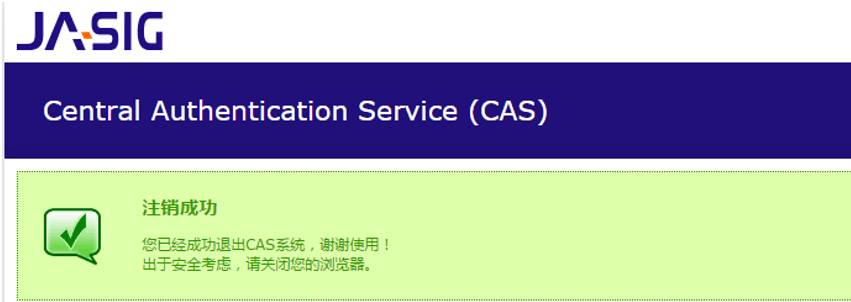
我们可以将这个链接添加到index.jsp中
<a href="http://localhost:9100/cas/logout">退出登录</a>
但我们更希望退出登录后,能自动跳转到某个页面,那如何处理呢?
修改cas系统的配置文件cas-servlet.xml

改为true后,可以在退出时跳转页面到目标页面,修改index.jsp的退出链接
<a href="http://localhost:9100/cas/logout?service=http://www.baidu.com">退出登录</a>
五、CAS服务端数据源设置
【需求分析】
我们现在让用户名密码从我们的品优购的user表里做验证
【配置数据源】
(1)修改cas服务端中WEB-INF下deployerConfigContext.xml ,添加如下配置
<bean id="dataSource" class="com.mchange.v2.c3p0.ComboPooledDataSource" p:driverClass="com.mysql.jdbc.Driver" p:jdbcUrl="jdbc:mysql://127.0.0.1:3306/pinyougoudb?characterEncoding=utf8" p:user="root" p:password="root" /> <bean id="passwordEncoder" class="org.jasig.cas.authentication.handler.DefaultPasswordEncoder" c:encodingAlgorithm="MD5" p:characterEncoding="UTF-8" /> <bean id="dbAuthHandler" class="org.jasig.cas.adaptors.jdbc.QueryDatabaseAuthenticationHandler" p:dataSource-ref="dataSource" p:sql="select password from tb_user where username = ?" p:passwordEncoder-ref="passwordEncoder"/>
然后在配置文件开始部分找到如下配置
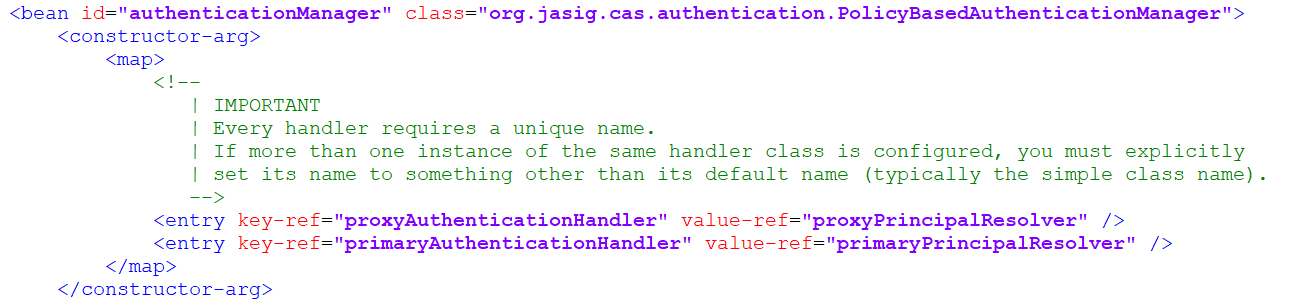
其中
是使用固定的用户名和密码,我们在下面可以看到这两个bean ,如果我们使用数据库认证用户名和密码,需要将这句注释掉。
添加下面这一句配置:
<entry key-ref="dbAuthHandler" value-ref="primaryPrincipalResolver"/>
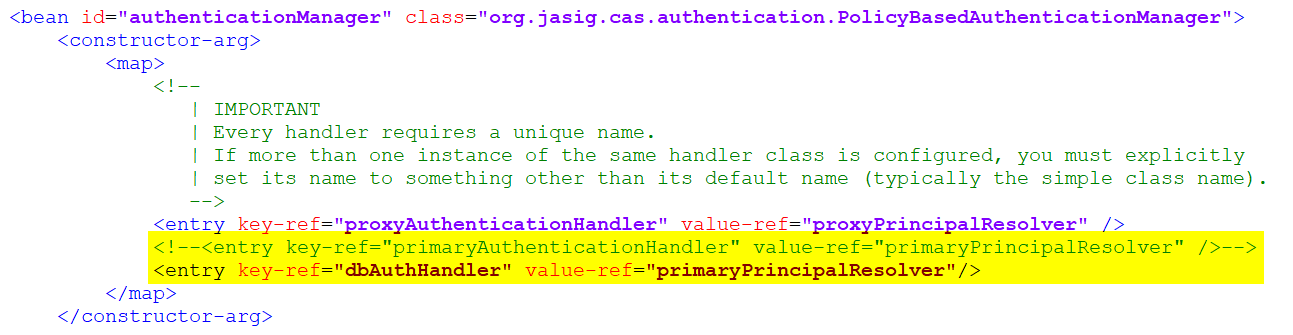
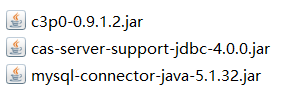
(2)将以下三个jar包放入webapps\cas\WEB-INF\lib下
用数据库中的用户名和密码进行测试
六、CAS服务端界面改造
我们现在动手将CAS默认的登录页更改为自己的品优购登陆页
6.1 改头换面
【拷贝资源】
(1)将品优购的登陆页login.html拷贝到cas系统下WEB-INF\view\jsp\default\ui 目录下
(2)将css js等文件夹拷贝到 cas目录下
(3) 将原来的casLoginView.jsp 改名(可以为之后的修改操作做参照),将login.html改名为casLoginView.jsp
【修改页面】
编辑casLoginView.jsp 内容
(1)添加指令
<%@ page pageEncoding="UTF-8" %><%@ page contentType="text/html; charset=UTF-8" %><%@ taglib prefix="c" uri="http://java.sun.com/jsp/jstl/core" %><%@ taglib prefix="spring" uri="http://www.springframework.org/tags" %><%@ taglib prefix="form" uri="http://www.springframework.org/tags/form" %><%@ taglib prefix="fn" uri="http://java.sun.com/jsp/jstl/functions" %>
(2)修改form标签
<form:form method="post" id="fm1" commandName="${commandName}" htmlEscape="true" class="sui-form">......</form:form>(3)修改用户名框
<form:input id="username" tabindex="1" accesskey="${userNameAccessKey}" path="username" autocomplete="off" htmlEscape="true" placeholder="邮箱/用户名/手机号" class="span2 input-xfat" />(4)修改密码框
<form:password id="password" tabindex="2" path="password" accesskey="${passwordAccessKey}" htmlEscape="true" autocomplete="off" placeholder="请输入密码" class="span2 input-xfat" />(5)修改登陆按钮
<input type="hidden" name="lt" value="${loginTicket}" /><input type="hidden" name="execution" value="${flowExecutionKey}" /><input type="hidden" name="_eventId" value="submit" /><input class="sui-btn btn-block btn-xlarge btn-danger" accesskey="l" value="登陆" type="submit" />修改后效果如下:

6.2 错误提示
在表单内加入错误提示框
<form:errors path="*" id="msg" cssClass="errors" element="div" htmlEscape="false" />
测试:输入错误的用户名和密码,提示是英文:

这个提示信息是在WEB-INF\classes目录下的messages.properties文件中
authenticationFailure.AccountNotFoundException=Invalid credentials.authenticationFailure.FailedLoginException=Invalid credentials.
设置国际化为zn_CN ,修改cas-servlet.xml
<bean id="localeResolver" class="org.springframework.web.servlet.i18n.CookieLocaleResolver" p:defaultLocale="zh_CN" />
我们需要将此信息拷贝到messages_zh_CN.properties下,并改为中文提示(转为Unicode编码)
authenticationFailure.AccountNotFoundException=\u7528\u6237\u4E0D\u5B58\u5728.authenticationFailure.FailedLoginException=\u5BC6\u7801\u9519\u8BEF.
第一个是用户名不存在时的错误提示
第二个是密码错误的提示

七、CAS客户端与SpringSecurity集成
7.1 Spring Security测试工程搭建
(1)建立Maven项目casclient_demo3(war) ,引入spring依赖和spring secrity 相关依赖 ,tomcat端口设置为9003
<properties> <spring.version>4.2.4.RELEASE</spring.version> </properties> <dependencies> <dependency> <groupId>org.springframework</groupId> <artifactId>spring-core</artifactId> <version>${spring.version}</version> </dependency> <dependency> <groupId>org.springframework</groupId> <artifactId>spring-web</artifactId> <version>${spring.version}</version> </dependency> <dependency> <groupId>org.springframework</groupId> <artifactId>spring-webmvc</artifactId> <version>${spring.version}</version> </dependency> <dependency> <groupId>org.springframework</groupId> <artifactId>spring-context-support</artifactId> <version>${spring.version}</version> </dependency> <dependency> <groupId>org.springframework</groupId> <artifactId>spring-test</artifactId> <version>${spring.version}</version> </dependency> <dependency> <groupId>org.springframework</groupId> <artifactId>spring-jdbc</artifactId> <version>${spring.version}</version> </dependency> <dependency> <groupId>javax.servlet</groupId> <artifactId>servlet-api</artifactId> <version>2.5</version> <scope>provided</scope> </dependency> <dependency> <groupId>org.springframework.security</groupId> <artifactId>spring-security-web</artifactId> <version>4.1.0.RELEASE</version> </dependency> <dependency> <groupId>org.springframework.security</groupId> <artifactId>spring-security-config</artifactId> <version>4.1.0.RELEASE</version> </dependency> </dependencies> <build> <plugins> <!-- java编译插件 --> <plugin> <groupId>org.apache.maven.plugins</groupId> <artifactId>maven-compiler-plugin</artifactId> <version>3.2</version> <configuration> <source>1.7</source> <target>1.7</target> <encoding>UTF-8</encoding> </configuration> </plugin> <plugin> <groupId>org.apache.tomcat.maven</groupId> <artifactId>tomcat7-maven-plugin</artifactId> <configuration> <!-- 指定端口 --> <port>9003</port> <!-- 请求路径 --> <path>/</path> </configuration> </plugin> </plugins> </build>(2)建立web.xml ,添加过滤器等配置
<?xml version="1.0" encoding="UTF-8"?><web-app xmlns:xsi="http://www.w3.org/2001/XMLSchema-instance" xmlns="http://java.sun.com/xml/ns/javaee" xsi:schemaLocation="http://java.sun.com/xml/ns/javaee http://java.sun.com/xml/ns/javaee/web-app_2_5.xsd" version="2.5"> <context-param> <param-name>contextConfigLocation</param-name> <param-value>classpath:spring-security.xml</param-value> </context-param> <listener> <listener-class>org.springframework.web.context.ContextLoaderListener</listener-class> </listener> <filter> <filter-name>springSecurityFilterChain</filter-name> <filter-class>org.springframework.web.filter.DelegatingFilterProxy</filter-class> </filter> <filter-mapping> <filter-name>springSecurityFilterChain</filter-name> <url-pattern>/*</url-pattern> </filter-mapping></web-app>
(3)创建配置文件spring-security.xml
<?xml version="1.0" encoding="UTF-8"?><beans:beans xmlns="http://www.springframework.org/schema/security" xmlns:beans="http://www.springframework.org/schema/beans" xmlns:xsi="http://www.w3.org/2001/XMLSchema-instance" xsi:schemaLocation="http://www.springframework.org/schema/beans http://www.springframework.org/schema/beans/spring-beans.xsd http://www.springframework.org/schema/security http://www.springframework.org/schema/security/spring-security.xsd"> <!--以下页面不拦截--> <http pattern="/login.html" security="none"></http> <http pattern="/login_error.html" security="none"></http> <!-- 页面拦截规则,use-expressions:是否启动SPEL表达式 默认是true --> <http use-expressions="false"> <!-- 当前用户必须有ROLE_USER的角色 才可以访问根目录及所属子目录的资源 /* 表示的是该目录下的资源,只包括本级目录不包括下级目录 /** 表示的是该目录以及该目录下所有级别子目录的资源 --> <intercept-url pattern="/**" access="ROLE_USER" /> <!--开启表单登陆--> <!--login-page:指定登录页面 default-target-url:指定了成功进行身份验证和授权后默认呈现给用户的页面。 authentication-failure-url:指定了身份验证失败时跳转到的页面。 --> <form-login login-page="/login.html" default-target-url="/index.html" authentication-failure-url="/login_error.html"/> <!--csrf disabled="true",关闭csrf --> <csrf disabled="true"/> </http> <!-- 认证管理器 --> <authentication-manager> <authentication-provider> <user-service> <user name="admin" password="123456" authorities="ROLE_USER"/> </user-service> </authentication-provider> </authentication-manager></beans:beans>
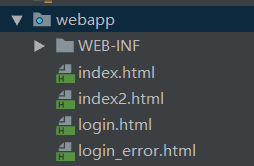
(4)添加html页面(详细见Spring Security 入门)
7.2 Spring Security与 CAS集成
(1)引入依赖
<dependency> <groupId>org.springframework.security</groupId> <artifactId>spring-security-cas</artifactId> <version>4.1.0.RELEASE</version> </dependency> <dependency> <groupId>org.jasig.cas.client</groupId> <artifactId>cas-client-core</artifactId> <version>3.3.3</version> <exclusions> <exclusion> <groupId>org.slf4j</groupId> <artifactId>log4j-over-slf4j</artifactId> </exclusion> </exclusions> </dependency>
(2)修改spring-security.xml
<?xml version="1.0" encoding="UTF-8"?><beans:beans xmlns="http://www.springframework.org/schema/security" xmlns:beans="http://www.springframework.org/schema/beans" xmlns:xsi="http://www.w3.org/2001/XMLSchema-instance" xsi:schemaLocation="http://www.springframework.org/schema/beans http://www.springframework.org/schema/beans/spring-beans.xsd http://www.springframework.org/schema/security http://www.springframework.org/schema/security/spring-security.xsd"> <!-- entry-point-ref 入口点引用 --> <http use-expressions="false" entry-point-ref="casProcessingFilterEntryPoint"> <intercept-url pattern="/**" access="ROLE_USER"/> <csrf disabled="true"/> <!-- custom-filter为过滤器,position 表示将过滤器放在指定的位置上,before表示放在指定位置之前,after表示放在指定的位置之后(Spring Security 内置过滤器表) --> <custom-filter ref="casAuthenticationFilter" position="CAS_FILTER"/> <custom-filter ref="requestSingleLogoutFilter" before="LOGOUT_FILTER"/> <custom-filter ref="singleLogoutFilter" before="CAS_FILTER"/> </http> <!-- CAS入口点 开始 --> <beans:bean id="casProcessingFilterEntryPoint" class="org.springframework.security.cas.web.CasAuthenticationEntryPoint"> <!-- 单点登录服务器登录URL --> <beans:property name="loginUrl" value="http://localhost:9100/cas/login"/> <beans:property name="serviceProperties" ref="serviceProperties"/> </beans:bean> <beans:bean id="serviceProperties" class="org.springframework.security.cas.ServiceProperties"> <!--service 配置自身工程的根地址+/login/cas --> <beans:property name="service" value="http://localhost:9003/login/cas"/> </beans:bean> <!-- CAS入口点 结束 --> <!-- 认证过滤器 开始 --> <beans:bean id="casAuthenticationFilter" class="org.springframework.security.cas.web.CasAuthenticationFilter"> <beans:property name="authenticationManager" ref="authenticationManager"/> </beans:bean> <!-- 认证管理器 --> <authentication-manager alias="authenticationManager"> <authentication-provider ref="casAuthenticationProvider"> </authentication-provider> </authentication-manager> <!-- 认证提供者 --> <beans:bean id="casAuthenticationProvider" class="org.springframework.security.cas.authentication.CasAuthenticationProvider"> <beans:property name="authenticationUserDetailsService"> <beans:bean class="org.springframework.security.core.userdetails.UserDetailsByNameServiceWrapper"> <beans:constructor-arg ref="userDetailsService"/> </beans:bean> </beans:property> <beans:property name="serviceProperties" ref="serviceProperties"/> <!-- ticketValidator 为票据验证器 --> <beans:property name="ticketValidator"> <beans:bean class="org.jasig.cas.client.validation.Cas20ServiceTicketValidator"> <beans:constructor-arg index="0" value="http://localhost:9100/cas"/> </beans:bean> </beans:property> <beans:property name="key" value="an_id_for_this_auth_provider_only"/> </beans:bean> <!-- 认证类 --> <beans:bean id="userDetailsService" class="cn.itcast.demo.service.UserDetailServiceImpl"/> <!-- 认证过滤器 结束 --> <!-- 单点登出 开始 --> <beans:bean id="singleLogoutFilter" class="org.jasig.cas.client.session.SingleSignOutFilter"/> <beans:bean id="requestSingleLogoutFilter" class="org.springframework.security.web.authentication.logout.LogoutFilter"> <beans:constructor-arg value="http://localhost:9100/cas/logout?service=http://www.baidu.com"/> <beans:constructor-arg> <beans:bean class="org.springframework.security.web.authentication.logout.SecurityContextLogoutHandler"/> </beans:constructor-arg> <beans:property name="filterProcessesUrl" value="/logout/cas"/> </beans:bean> <!-- 单点登出 结束 --></beans:beans>
(3)创建UserDetailsServiceImpl
/** * 认证类 */public class UserDetailServiceImpl implements UserDetailsService { @Override public UserDetails loadUserByUsername(String username) throws UsernameNotFoundException { System.out.println("经过认证类:" + username); //构建角色集合 List<GrantedAuthority> authorities = new ArrayList<>(); authorities.add(new SimpleGrantedAuthority("ROLE_USER")); //这个类在此处的作用不是认证,因此password的参数可以为"" return new User(username, "", authorities); }}注意:这个类在此处的作用不是认证,CAS在认证返回来的时候才调用这个类的方法,即这个类在执行这个方法的时候已经是通过认证了。它的主要作用是:登陆后得到用户名,根据用户名查询角色列表或执行一些逻辑。
7.3 获取登录名
我们在处理后端逻辑需要获得登录名,那么如何获取单点登录的用户名呢? 我们下面来做个测试。
(1)web.xml 添加springmvc
<servlet> <servlet-name>springmvc</servlet-name> <servlet-class>org.springframework.web.servlet.DispatcherServlet</servlet-class> <!-- 指定加载的配置文件 ,通过参数contextConfigLocation加载--> <init-param> <param-name>contextConfigLocation</param-name> <param-value>classpath:springmvc.xml</param-value> </init-param> </servlet> <servlet-mapping> <servlet-name>springmvc</servlet-name> <url-pattern>*.do</url-pattern> </servlet-mapping>
(2)创建springmvc.xml
<?xml version="1.0" encoding="UTF-8"?><beans xmlns="http://www.springframework.org/schema/beans" xmlns:xsi="http://www.w3.org/2001/XMLSchema-instance" xmlns:p="http://www.springframework.org/schema/p" xmlns:context="http://www.springframework.org/schema/context" xmlns:dubbo="http://code.alibabatech.com/schema/dubbo" xmlns:mvc="http://www.springframework.org/schema/mvc" xsi:schemaLocation="http://www.springframework.org/schema/beans http://www.springframework.org/schema/beans/spring-beans.xsd http://www.springframework.org/schema/mvc http://www.springframework.org/schema/mvc/spring-mvc.xsd http://code.alibabatech.com/schema/dubbo http://code.alibabatech.com/schema/dubbo/dubbo.xsd http://www.springframework.org/schema/context http://www.springframework.org/schema/context/spring-context.xsd"> <context:component-scan base-package="cn.itcast.demo" /> <mvc:annotation-driven /> </beans>
(3)创建UserController
@RestControllerpublic class UserController { @RequestMapping("/findLoginUser") public void findLoginUser() { String name = SecurityContextHolder.getContext().getAuthentication().getName(); System.out.println(name); }}地址栏输入http://localhost:9003/findLoginUser.do 即可在控制台看到输出的登录名。
7.4 退出登录
修改spring-security.xml
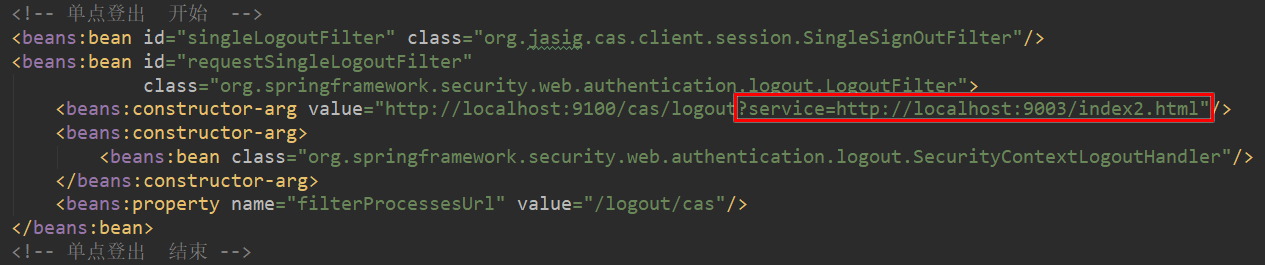
在页面上添加链接
<a href="/logout/cas">退出登录</a>
创建index2.html,将index2.html设置为可匿名访问
<http pattern="/index2.html" security="none"></http>